LinkedIn Queens puzzle #911 for October 28, 2026: spoiler-free hints first, then the complete solution when you want it.
This is an earlier Queens puzzle. Latest Queens Answer: #927 (Nov 13)
Need a little help?
Reveal hints one at a time to avoid spoilers.
Reveal Hint #1Hint #1
Use the small regions near the top and the lower-left corner to restrict their queen positions.
Reveal Hint #2Hint #2
The row 1 queen is in column 6, and the row 2 queen is in column 2.
Reveal Hint #3Hint #3
The queen columns from top to bottom are 6, 2, 7, 5, 3, 1, 4.
Ready for the answer?
Place one queen at a time, or reveal the whole board.
Reveal Full SolutionHide Solution
Queens #911 Solution
Queen positions (row, column): R1C6, R2C2, R3C7, R4C5, R5C3, R6C1, R7C4.
How to Solve Queens #911
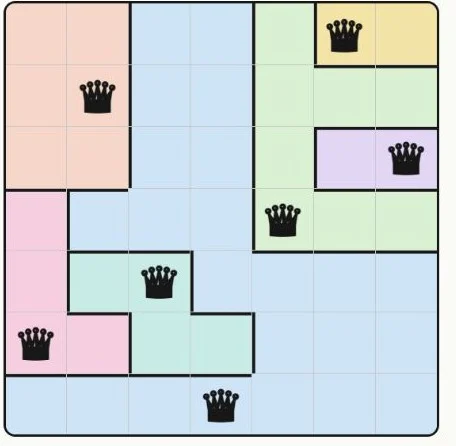
Queens 911 uses a 7×7 board. Place queens at R1C6, R2C2, R3C7, R4C5, R5C3, R6C1, R7C4.
- Resolve the upper regions with queens at R1C6 and R2C2.
- Place the next two at R3C7 and R4C5. They occupy different columns and do not touch diagonally.
- The lower-left regions take R5C3 and R6C1.
- Finish the large remaining region with R7C4.
Each row, column and colored region contains one queen. Adjacent-row queens are separated by more than one column, so no queens touch.
Share this puzzle
Help a friend who is stuck. The answer stays hidden until they reveal it.